


Stop Motion Studio
4.110.10K Reviews
App Specs
- Version
- 25.12.8582
- Updated On
- License
- Free
- Downloads
- 10,000,000+
- Developer
- Cateater
- Categories
- Photography
- Platform
- Android, iOS
Screenshots
 Analysis by AppCompare
Have you ever watched those mesmerizing stop-motion films and thought, "I wish I could create something like that"? Well, now you can! Let me tell you about Stop Motion Studio, an app that’s turning everyone into mini Spielberg wannabes, right from their smartphones.
A small project can be easier to follow
One useful way to approach a stop-motion project is to keep the first one deliberately small: a toy taking a few steps, a pencil moving across a desk, or a piece of paper folding itself. That gives you time to learn the app’s frame-by-frame rhythm without also having to manage a complicated story. I’d set the phone where it can stay still, arrange the objects within reach, and capture a short test before spending time on a longer scene.
That simple routine also makes the interface easier to learn. Instead of hunting through controls while your subject is ready to move, you can become familiar with the camera and project workflow before the scene matters. For a child or a first-time animator, that can make the experience less intimidating; for an adult helping them, it offers a natural way to teach patience, planning, and cause and effect.
Readability and navigation in a hands-on workflow
Stop-motion work has a built-in challenge: you repeatedly switch between arranging a subject, capturing an image, and checking what has changed. A straightforward starting screen and a project-based workflow help keep those tasks understandable. In my view, that matters more than an elaborate menu system when the main job is to make small, careful adjustments and keep the camera ready.
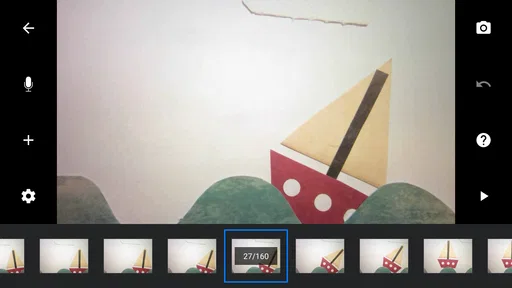
Still, a clean interface does not remove every navigation demand. Editing frames and adjusting timing call for attention, and a new user may need a little practice to understand how each change affects playback. I’d learn the capture-and-review routine first, then explore editing and sound once the basic sequence works. That order keeps the early experience manageable rather than turning the first project into a tour of every tool.
Motor and sensory considerations while animating
Stop-motion asks for repeated, precise actions: move an object slightly, take a frame, and repeat. That can be satisfying for someone who enjoys careful hands-on work, but it can also be tiring for someone who finds small movements or repeated tapping difficult. A stable phone position and props that are easy to grip can reduce needless adjustments. I’d also plan a short sequence at a time, so there is a clear stopping point instead of an expectation to finish everything in one sitting.
The visual feedback is part of the creative appeal, but reviewing a sequence repeatedly can feel busy, especially when experimenting with motion or sound. It helps to work in a quiet, familiar space and make deliberate pauses between capture and playback. These are practical ways to shape the session, not a claim that the app has specialist accessibility tools; the best setup will depend on the person using it and the device in their hands.
Worth Reading Before You Choose

Flipboard Shows What News Apps Must Do Beyond the Feed

Switching to Android Auto Means Rethinking Your Driving Routine

Google Calendar Makes a Crowded Week Easier to Manage

Ludo King Makes the Most of the Minutes Between Plans

Baby Panda World Brings Quick Play to Modern Phones, but Its Game Library Feels Busy

ESPN’s Live Game View Makes Following Close Games Easier
Where this kind of animation fits
I can imagine using the app on a rainy afternoon at home: set a phone on a firm stack of books, place a few toy figures on a clear table, and make a short scene in which one figure crosses the room. The key is to avoid bumping the setup between frames. Even a tiny change in camera position can make the background jump, so I’d keep the table clear and ask everyone nearby not to touch it until the shots are done.
That workflow also suits a classroom activity, a craft project, or a quick visual explanation of how something changes over time. It is less convenient when you need to work while walking around, capture an unpredictable event, or finish a polished video in a hurry. Stop motion is intentionally deliberate: every movement has to be staged. If the goal is simply to record a moment as it happens, the regular camera app is the more sensible choice.
Getting Started with Stop Motion Studio
If you've got an idea itching to come to life, Stop Motion Studio is your gateway. Available on both Android and iOS, this app is your portable studio, making it super easy to dive into the world of stop-motion animation. The moment you open the app, you’ll be greeted with a clean, intuitive interface. No fluff, just the essentials to get your creative juices flowing.
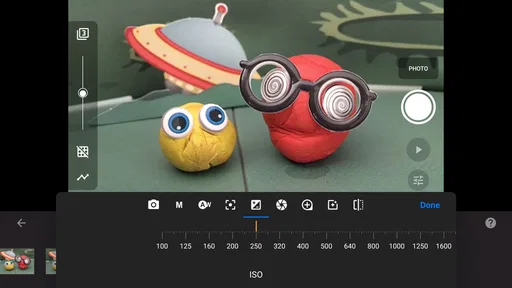
The setup process is a breeze. You simply start a new project, and off you go! The app uses your device’s camera to capture frames, and you can adjust the frame rate to control the speed of your animation. And trust me, experimenting with frame rates is where the magic happens.
Features That Fuel Creativity
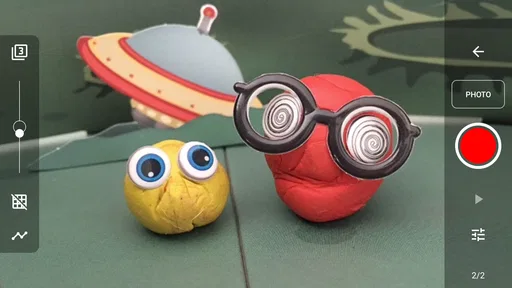
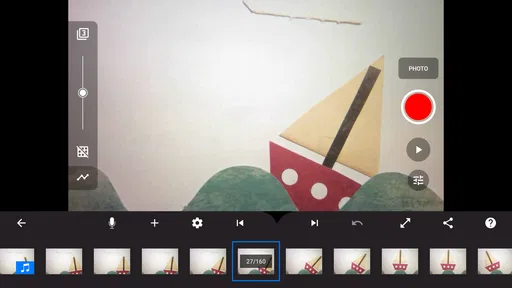
One of the first things you’ll notice is the onion-skinning feature. It overlays the previous frame on your current view, allowing you to make precise adjustments. This is a game-changer, especially when you’re aiming for fluid motion in your scenes.
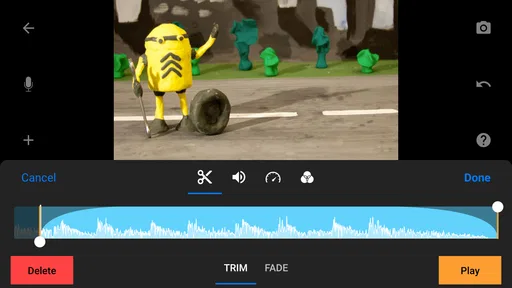
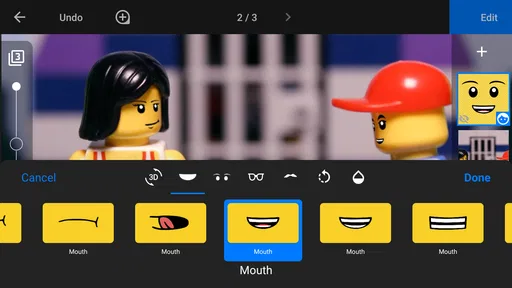
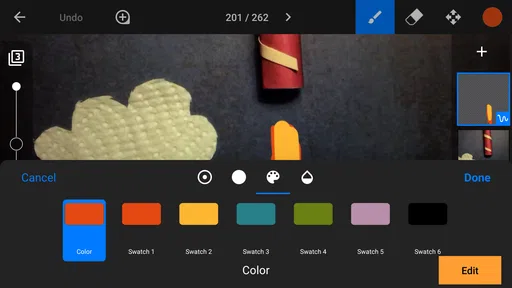
The app also offers a variety of editing tools. You can cut, copy, paste, and even delete frames. Plus, there’s a great selection of sound effects and music tracks to enrich your project. And if that’s not enough, you can import your own audio files. It’s like having a mini production studio in your pocket!
Unleashing Your Inner Animator
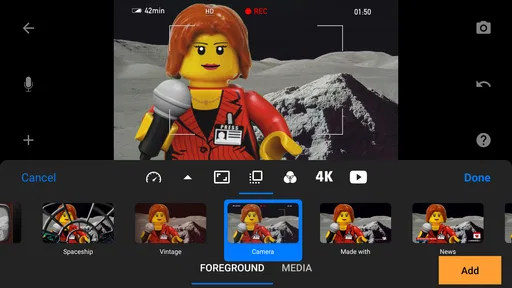
Once you’ve captured your frames, the fun really begins. Adjusting the timing, adding effects, and layering sounds – this is where your vision comes to life. The app supports 4K Ultra HD, so your animations will look sharp and professional. You can also add text overlays and credits, giving your project that polished, cinematic feel.
Sharing your masterpiece is a cinch. With a tap, you can export your video and share it directly to your social media platforms or save it to your device. Whether it’s a quirky short film or an epic saga, your stop-motion creations are sure to impress your friends and followers.
A few practical choices before you begin
For a first project, I’d choose a simple subject with a clear path and a background that will not change. Take a test sequence, watch it back, and adjust the spacing between movements if the action looks too abrupt or too slow. This is a more useful way to learn timing than trying to plan a long film in your head before you have seen how your objects look in motion.
Onion skinning is especially helpful when a character needs to travel smoothly across the frame, but it does not replace a steady camera or consistent lighting. I’d avoid moving the phone once capture begins and keep the scene away from changing daylight if possible. These small choices prevent common distractions in the finished animation, though they require a little preparation that ordinary video recording does not.
How it compares with other ways to make a video
Compared with a standard camera app, this is the better fit when you want to control every pose and create movement from still images. A regular video camera is faster for spontaneous moments and natural motion, while a conventional editing app is more suitable when you already have footage and mainly want to trim, arrange, or polish it. Stop Motion Studio’s particular strength is bringing capture and frame-level adjustments into the same creative process.
That focus is also a limit. If you want a fast result, dislike repeating small actions, or need a highly controlled production workflow, this may not be the tool you reach for first. The app can help make animation approachable, but it cannot make the physical work disappear: props need to be repositioned, the camera needs to remain steady, and a longer sequence takes patience.
Why It’s Worth a Try
Now, I know what you’re thinking – is this something I can actually do? Absolutely! Stop Motion Studio is designed for everyone, from beginners to seasoned animators. It’s user-friendly, yet packed with features that allow for advanced creativity.
What I love most is how accessible it makes animation. You don’t need expensive equipment or a studio setup. All you need is your smartphone, a bit of imagination, and perhaps some props or toys lying around your house. The app truly democratizes the art of stop-motion, making it possible for anyone to create something special.
Who is likely to enjoy it?
I’d recommend it to curious beginners, families looking for a shared craft, and people who enjoy building scenes one careful change at a time. It can also be useful for explaining a process visually: a few captured steps can show how a drawing develops or how an object is assembled. Cateater’s photography app has been around since March 9, 2015, and its continued appeal is reflected in an average rating of 4.1 from around 126,000 ratings.
The free app is rated for Everyone, and it has more than 10 million installs. That broad reach makes sense for a creative tool that can start with toys and a phone, but I would not assume every project is effortless or that every feature is included at no cost. In-app purchases are listed at $5.99 per item, so I’d begin with a small test project and decide whether the tools available in your version suit your needs before spending anything.
Remaining barriers and sensible expectations
The biggest practical barrier is often the setup rather than the software. A phone that slips, a crowded surface, or a subject that is hard to reposition can make each frame frustrating. If holding a device steady is difficult, a fixed resting place may help, but the exact solution depends on the person and equipment. Likewise, someone sensitive to repeated visual review may prefer shorter sessions and fewer playback checks.
There is also a learning curve in deciding how far to move a subject between frames. Large changes create jumpy motion; very small changes make a sequence take longer to capture. I’d use a short test to find a comfortable balance instead of trying to produce a flawless result immediately. The current version is 25.12.8582 and the minimum operating system is 7.0, details worth checking against your device before you plan a project.
Final Thoughts
In a world where digital content is king, Stop Motion Studio offers a refreshing way to express creativity. Whether you’re looking to dabble in animation or embark on a new hobby, this app is well worth checking out. It’s fun, addictive, and before you know it, you’ll be planning your next big project. So why not give it a whirl? Your inner animator will thank you!
My honest recommendation is to try it when you have time for a hands-on project, not when you need instant footage. Its frame-by-frame approach rewards preparation and patience, and its appeal is strongest when you enjoy shaping the action yourself. If repeated tapping, careful object movement, or a still workspace are poor fits for your situation, another way to make a video may feel more comfortable. For everyone else, a small first scene is a low-pressure way to find out whether this kind of animation clicks.
Pros
- User-friendly interface for beginners.
- Wide range of editing tools available.
- Supports 4K video resolution.
- Easy sharing options for social media.
- Compatible with Android and iOS devices.
Cons
- Free version has limited features.
- In-app purchases can be expensive.
- Occasional crashes on older devices.
- No cloud storage integration.
- Limited sound effects library.
FAQs for Stop Motion Studio
What platforms is Stop Motion Studio available on?
Stop Motion Studio is available on both Android and iOS devices. Additionally, it can be used on tablets and desktops, making it versatile for various creative needs. This cross-platform availability ensures that users can seamlessly create and edit their projects on multiple devices.
Is Stop Motion Studio suitable for beginners?
Yes, Stop Motion Studio is designed to be user-friendly, making it an excellent choice for beginners. The app offers intuitive controls and tutorials to guide users through the process of creating stop motion animations. Advanced features are also available for more experienced users, providing a comprehensive tool for all skill levels.
Does Stop Motion Studio offer any special features?
Stop Motion Studio comes packed with features such as overlay mode, grid mode, and frame-by-frame editor. It also offers green screen capabilities, allowing users to create professional-quality animations. The app supports 4K Ultra HD resolution, ensuring high-quality output for all projects.
Are there any in-app purchases in Stop Motion Studio?
While Stop Motion Studio offers a free version with basic features, it also provides in-app purchases for additional functionality. Users can purchase the full version to unlock advanced tools such as sound effects, voiceover capabilities, and import/export options, enhancing the creative process.
Can I share my animations directly from Stop Motion Studio?
Yes, Stop Motion Studio allows users to easily share their animations directly from the app. Users can export their projects in various formats and share them on social media platforms, or save them to their devices. This makes it convenient to showcase creative work to a wider audience.


